April 7th, 2011
@librarylaw urged that one Take 5 minutes to add your comments to Google privacy requirements deadline May 2 #privacy #google #ftc #epic. The form at Electronic Privacy Information Center (”EPIC”) notes that, “The FTC is seeking public comment on its proposed Agreement with Google regarding Google Buzz, and EPIC wants your voice to be heard! Use the form below to help build your comments. EPIC will send your comments and information to the FTC and use them to help us write our own comprehensive recommendations to the FTC.”
I was struck by the fact that there was likely a large overlap in the concerns covered in this agreement and in the December 2010 FTC White Paper: Protecting Consumer Privacy in an Era of Rapid Change, A Proposed Business and Policy Framework [PDF].
I’d heard about the white paper from Kaliya Hamlin and Mary Hodder, executive director and chairman, respectively, of the Personal Data Ecosystem Collaborative Consortium (PDECC) at a She’s Geeky session in late January. They were writing a response to that white paper, I’d added my comments to their response and my name as a signer. (A nice review of their response, if you don’t want to read the 33 pages, is at “Conversational Commerce Update: End-user Advocates Set FTC Straight on Personal Data Ecosystem.”
My response to the FTC is after the cut. I spent more than the five minutes @LibraryLaw recommended, but that’s because i didn’t use EPIC’s form.
There’s enough time that perhaps the Personal Data Ecosystem Collaborative Consortium (PDECC) can get in a formal response to the FTC as well. (Now Mary has practice using the document upload function!)
Read the rest of this entry »
People who looked at this item also looked at…
Tags: IDM, Personal Data Ecosystem, privacy, user centric identity management
Posted in digital archaeology, digital libraries, identity, remix, social graph | Comments Off
March 28th, 2011
In February i joined with a hundred Friends (Quakers) and friends at a retreat center in North Carolina. It was my second time attending this community in person, a community i’ve participated in through a mailing list for three years or so.
I participate in the Society of Friends both because it feels like coming home and because it stretches and transforms me as i learn how to be with community.
It is a tradition among Friends that when we gather, we share that community’s experience with others through a letter. Below the cut is the letter from the February Gathering, also posted at the FLGBTQC website.
Read the rest of this entry »
People who looked at this item also looked at…
Posted in In the Society of Friends | Comments Off
January 31st, 2011
I’ve got coverage of the Christmas Bird Count at the very least to release.
Soon!
People who looked at this item also looked at…
Posted in Uncategorized | Comments Off
January 4th, 2011
My December news work is on a list with thank you notes, new years cards, and a variety of financial changes for the new year. I’ll promptly pass on this notice on behalf of the Santa Clara Valley Audubon Society. They note some decisions that will be made soon. The meetings of interest are in Cupertino:
Parks and Recreation Commission (This is expected to be a relatively short meeting)
Thursday, January 6, 2011, 7:00PM
Community Hall, 10350 Torre Avenue, Cupertino
Cupertino City Council (This is expected to be a very long meeting)
Thursday, January 18, 2011, 6:30PM
Community Hall, 10350 Torre Avenue, Cupertino
For agendas and staff reports start here: http://www.cupertino.org/index.aspx?page=544
After the cut, the background and talking points from the Santa Clara Valley Audubon Society: Read the rest of this entry »
People who looked at this item also looked at…
Tags: Cupertino, stevens creek, Stevens Creek Trail
Posted in stevens creek, streamkeeping | Comments Off
November 28th, 2010
Recreation
Gurmeet Singh Manku, computer science researcher at Stanford keeps track of his area hikes, and he reported on Upper Stevens Creek Country Park at the beginning of November. At the other end of the month and the other end of the creek is an “Urban Outings” story presented by Greenbelt Alliance in the San Francisco Chronicle. This story described the Stevens Creek Shoreline Nature Study Area.
Flood control on Permanente Creek
The water district is hosting a second series of “design workshops” on its Permanente Creek Flood Protection project and reported in the Mercury News.
Information in the flyers from the Water District about this effort, part of the Clean, Safe Creeks and Natural Flood Protection Plan, included:
Please join the Santa Clara Valley Water District for a second round of design workshops regarding a flood detention area at McKelvey Park, Cuesta Park Annex and Blach School. Each meeting will focus on one proposed detention area. …. The purpose of these meetings is to update interested members of the public on revisions made to the conceptual site design based on feedback received at the initial design workshops held in September 2010. Staff from the water district design team will provide a current project overview and solicit further public input.
…. The flood detention area would capture peak flood flows that would currently overtop the creek banks during heavy rainstorms. The flood waters captured at the height of the storm runoff would be later released back into the creek and the park features would be restored once waters have receded.
The Permanente Creek Flood Protection project area includes nearly 11 miles of Permanente Creek starting in the foothills above Cupertino and continuing through the cities of Los Altos and Mountain View. The project goals are to protect at least 1,664 properties from a major flood, improve riparian habitat and provide opportunities for trails or other recreational uses.
The Los Altos Crier and Mercury News reported on the neighborhood response during the Blach School design workshop.
Trails
The city of Mountain View posted this update about the Permanete Creek Trail construction:
The City is proceeding with a project to extend the Permanente Creek Trail from its current terminus on the north (Bay) side of Highway 101 to the south side of Old Middlefield Way by constructing a pedestrian/bicycle crossing over Highway 101 and a tunnel under Old Middlefield Way.
The City awarded a construction contract in October 2010 and expects to begin construction in December 2010 and be completed in early 2012. Additional notices of the project schedule and construction-related impacts will be provided to area residents and businesses during construction. For more information, call the Public Works Department at (650) 903-6311.
The Lehigh Permanente Southwest Cement Plant
The Los Altos Crier reports that the Santa Clara County Board of Supervisors moved a public hearing to determine whether or not Lehigh Permanente Southwest Cement Plant in Cupertino has been operating legally from 23 November to to an uncertain date in January or February 2011.
Reference links after the cut. Read the rest of this entry »
People who looked at this item also looked at…
Tags: cuesta park, lehigh southwest cement company, permanente creek, permanente creek trail, permanente quary
Posted in stevens creek, streamkeeping | Comments Off
November 27th, 2010
Charles Freeman’s thesis is that the theological orthodoxy of the trinitarian principles as decided at the Council of Nicea was not a revelation of truth from divine sources but was established by the imperial order of Theodosius. The historical account of the politics that drove the Church during this period is stomach turning, as politics and power take their place in the structure of the Christian establishment, and heresies are defined as those theologies that do not fall in line with imperial edict. (Some of these heresies are ones Barclay claimed Friends did not espouse: this provides an interesting insight into the historical origin of those heresies.)
The definition of a truth by edict and the enforcement of belief in that truth sets the Church in opposition to the intellectual heritage of Greek thought and a culture of religious diversity. As Nicean theology is established by edict, the intellectual debate is crushed before a resolution found. For a millennia, theology — even Protestant theology — is limited. In one of the final chapters, Freeman discusses the logician Abelard’s attempt to structure a frame for the trinitarian theology and how his attempts slip into the defined heresies, more due to the challenge applying rigorous thought to the theology than due to a desire to challenge it. Because logic and reason fail to underpin the Nicean theology, logic and reason become suspect and this sets up the apparent contradictions of religion and science.
Review: http://www.chron.com/disp/story.mpl/life/books/reviews/6378531.html
I tried to find some critical reviews and what i found was a review of the author’s earlier book, Closing of the Western Mind, at http://www.bede.org.uk/closing.htm . Despite being rather critical, the reviewer does allow that, “That said, Freeman’s exposition of the arguments about Arianism and the Trinity are probably the most lucid ever written. ”
While all books have bias, and Freeman clearly has a humanist bias, i don’t find evidence that his history is completely off. The conclusion he draws from the history is arguable: his assignment of great importance to one historical event is as simplistic as any single cause argument. His presentation of the history is clear enough, though, that one may draw their own conclusions and learn much more about the Early Church from a perspective very different of the tradition passed through the orthodox church.
http://www.worldcat.org/title/ad-381-heretics-pagans-and-the-dawn-of-the-monotheistic-state/oclc/233549476&referer=brief_results
A number of local libraries have copies.
Another book by Freeman looks rather interesting: http://yalepress.yale.edu/yupbooks/book.asp?isbn=9780300125818
People who looked at this item also looked at…
Tags: book review, theology
Posted in all-consuming | Comments Off
October 30th, 2010
Santa Clara County Creeks Coalition Fourth Annual Creeks and Watershed Conference is Saturday, 6 Nov, 8:00 AM to 5:00 PM, hosted by the city of San Jose at the Camden Community Center. The event is free but a $6.00 lunch donation requested.
The agenda and registration form is at http://www.sccreeks.org/index.php/conference.html.
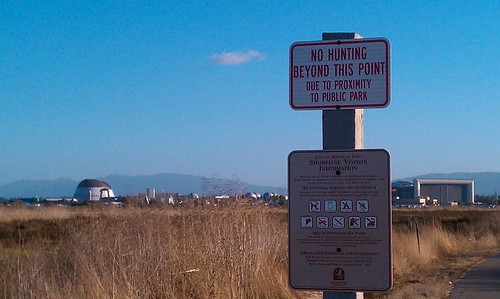
Duck hunting season has opened in the Don Edwards National Wildlife Refuge. Stevens Creek trail hunters commented on “catching” ducks to reporters, earning some jeering in a Field and Stream blog.
For reference, the 2010 – 2011 Waterfowl Hunting Season Summary. The San Francisco Bay is in the “balance of state” zone. Hunting will continue, Wednesdays, Saturdays, and Sundays, until 30 Jan 2011. The Stevens Creek-adjacent hunting areas are AB1 and A2E. There’s a disabled access blind at pond A2E available by reservation only.
The powerpoint slide show [PDF] from the Waterfowl Hunt Informational Meeting Oct. 6 has an important point for hunters: pack your litter out!
After the cut:
* map of the hunting area,
* rainy season and the Santa Clara Valley Water District,
* news from the Stevens and Permanente Creek Watershed Council, and
* creek reference site round-up.
Read the rest of this entry »
People who looked at this item also looked at…
Tags: Crittenden Lane Trailhead, Don Edwards National Wildlife Refuge, don edwards nwr, hunting, Pond A2E, Pond AB1, spcwc, Whisman Slough
Posted in stevens creek, streamkeeping | Comments Off
October 17th, 2010
This troubleshooting post may be of no interest to anyone but me. I’ll also update this post over the next few weeks as i document and resolve the issues i’ve seen. More after the cut. Read the rest of this entry »
People who looked at this item also looked at…
Tags: android, evo, iCal, missing sync
Posted in household | Comments Off
September 29th, 2010
My summer presented some challenges in keeping up with the creek news. I hope the fall months will afford better time to publish monthly reviews.
Trails
The most exciting news is the Moffett Field Bay Trail Grand Opening
On behalf of the San Francisco Bay Trail Project, U.S. Fish & Wildlife Service, and South Bay Salt Pond Restoration Project you are invited to celebrate completion of the 2.4-mile Bay Trail segment at Moffett Field
After many years of work, this much anticipated opening connects Sunnyvale and Mountain View and completes the missing link along a 26-mile continuous section of trail between East Palo Alto and San Jose. The trail opening is the culmination of years of collaboration among many different agencies and is one of several public access and recreation projects within the 15,100-acre South Bay Salt Pond Restoration Project.
The Mountain View Voice reported on the 27 July regular meeting of the Mountain View City Council (agenda). The council voted to approve highway over-crossings for the Stevens Creek and Permanente Creek trails, and the article discusses some of the financial choices. The staff report for the Stevens Creek Trail over crossing of Highway 85 is available as a pdf and has a nice architect’s visualization as well as the full analysis of heritage tree removal and mitigation.The staff report on the extension of the Permanente Creek Trail over Highway 101 and under Old Middlefield Way is also available as a pdf and also has a visualization and documents the agreement with the water district.
Mercury News article Ten things to do in the Bay Area before summer ends encourages following the trails along the cree, calling out specifically the headwaters trails at Monte Bello. Another Mercury news article calls out three Stevens Creek trails for their accessibility:
- Stevens Creek Shoreline Nature Study Area: This bayfront preserve, located adjacent to Mountain View Shoreline Park, offers a quarter-mile-long aggregate surface trail along a levee — perfect for bird-watching. Access to the preserve is through Shoreline Park, where restrooms are available.
- Stevens Creek Trail: This trail runs for miles, almost parallel to Highway 85, in Cupertino and Mountain View, with a connection to Byxbee Park in Palo Alto’s Baylands. The trail is all paved and generally two-laned, with frequent benches. There are numerous trailheads from local streets. (For more information, visit www.stevenscreektrail.org/index.shtml)
- Monte Bello Open Space Preserve: The first 500 feet of the Stevens Creek Nature Trail, beginning from Monte Bello’s main parking area, is a gently sloping segment with an average five percent grade. It takes visitors to a dramatic vista point where Stevens Creek Canyon, Mount Umunhum and Loma Prieta are visible. A bench is also located here, allowing visitors the opportunity to sit and enjoy the view. There are two wheelchair-accessible parking spaces and a wheelchair-accessible restroom at the parking lot.
Picchetti Ranch Open Space Preserve, which overlooks Stevens Creek reservoir, was also mentioned.
Lehigh Cement
EPA Releases Final Results from Cupertino School Air Monitoring Initiative: No Unsafe Levels of Hexavalent Chromium Detected (EPA press release)
Shorts
The Norman Y. Mineta San Jose International Airport (SJC) provides a site showing air traffic with a ten minute delay. It’s not clear if it will show the air craft type of flights taking off from Moffett, but flights from Palo Alto do occasionally show up. * For Hangar One, the July Restoration Advisory Board Meeting live blog. * The Tour de Menlo in mid August covers some upper watershed landscape including lunch stops at the Picchetti Open Space Preserve and Winery.
People who looked at this item also looked at…
Tags: Moffett Field Bay Trail, monte bello, permanente creek trail, stevens creek, Stevens Creek Trail
Posted in stevens creek | Comments Off
September 10th, 2010
Happy Hari Raya! (As Eid is celebrated in Malaysia)
The Friends (Quakers) Committee on National Legislation offers a petition to publicly take a stand with American Muslims. I would sign this on principle, but i am also able to envision my brother’s family and my sister-in-law’s extended family when i think of the face of American Muslims. The vita for one specific American Muslim reads, “Professor Bush has been a visiting professor Beijing LLM program since 2005, where she teaches courses in both torts and US constitutional law. Professor Bush is also a professor for Temple Law School’s Judicial Education Program at the National Judicial Training College in Beijing, China. Professor Bush has published articles on US constitutional and comparative law, and has made many presentations on legal issues before various organizations, commissions as well as institutions both in China and in the United States.”
The petition available at FCNL reads:
I stand with American Muslims and their supporters in the Christian and Jewish faith who are planning to build an Islamic Cultural Center in downtown Manhattan.
I stand with American Muslims in exercising their freedom to gather and worship, as guaranteed by our U.S. Constitution.
As a people and as a country, we can continue this country’s project to build a more perfect union by welcoming the Islamic Cultural Center and helping it to become a reality.
People who looked at this item also looked at…
Posted in advocacy | Comments Off


